Showing posts with label technology. Show all posts

Thursday, April 28, 2011

Android's popularity growing, iPhone drops a bit

According to new numbers just released by Nielsen Research, the launch of the new Verizon iPhone hasn't visibly slowed the popularity of Google's Android operating system in the U.S., at least not yet.
In three monthly surveys conducted from January to March of this year, about 30.9 percent of all U.S. respondents planning to buy a new smartphone in the next year said they wanted an Android phone. The number is up 25.8 percent from July's 2010 figures
Only 30 percent of respondents said they wanted an iPhone, down from 32.7 percent last year. Research in Motion (RIM), Microsoft and Palm also lost some market share. Residents in the U.S. who plan to buy Nokia smartphones didn't even figure on the report.

For now, it's not exactly clear how much additional ad revenue Android generates for the search giant, but it couldn't be that much, according to Nielsen.

Although the Android gains are impressive, they aren't surprising. It looks like we're headed to a smartphone only world, and Google has produced a rather good operating system and it's open source, ie: free.

Apple sold $10.45 billion worth of iPhones in the last quarter alone, well overtaking Nokia -- the world's largest manufacturer of mobile phones -- for the first time. Nokia is still suffering a lot in the U.S., and the situation appears to be getting worse lately, as sales continue to drop in North America, but are still relatively stable in Europe and Asia, however.

But Apple's iOS drop in popularity is likely within a margin of error, nevertheless.

But still unexplained is the rather large difference between purchase intent going forward and recent purchases of smartphones. Apple isn't even closing all the people who want an iphone let alone its share of the "don't cares".
As a company, Apple certainly isn't marketing very hard simply because it's making and selling all the phones that it can, and without spending much on advertising. So, can you blame them?

iPhones are high end devices and Apple customers like to spend money on the company's innovative products. Nevertheless, Androids are still good phones as well. As long as high end means more revenue to app developers, the iPhone is going to continue to do well, since many app developers still prefer to work with iOS as their number one choice, and with Android as their close second.

Let's look at last quarter in more detail

In December 2010, overall smartphone adoption about reached 29.7 percent of all mobile subscribers in the U.S. Apple's iPhone iOS and RIM's BlackBerry OS 6.0 managed a close tie for U.S. market share, with each mobile operating system taking about 27 percent of the share of the market, while Android lagged slightly at 22 percent.

But nevertheless, Android and iOS are still the most desired operating systems says Nielsen. The research firm found that of all users planning to get a new smartphone in 2011, 35 percent of current smartphone owners showed a preference for the Apple iPhone, while about 28.2 percent of those upgrading from a smarpthone or feature phone indicated they wanted a device with an Android operating system as their next mobile phone.

These numbers were largely expected by most wireless industry observers, however.

Apple’s iPhone iOS and mobile devices with the Android OS were the most desired among likely smartphone upgraders as well according to Nielsen, with Apple showing a slight lead among those age 55+, 18 to 24 and 25 to 34.

Feature phone owners planning to get a smartphone were less likely to have made up their mind about the OS they will choose, Nielsen warned. About 25.1 percent still weren't sure what their next desired OS might be compared to 13 percent of smartphone owners.

Overall, women planning to get a smartphone are more likely to want an iPhone as their next device, with slightly more males preferring Android, the Nielsen survey revealed.

But on Oct. 1st, the numbers that were released had suggested that Google's Android mobile OS was rapidly gaining market share in the enterprise smartphone market segment. And there are numerous signs that suggest the wireless industry is getting more and more competitive as each day goes by.
Based on Android's improved security and multitasking user features, Android has a very good chance in being a strong competitor to Research In Motion's (RIM) BlackBerry and the Motorola Droid in the coming 6 to 12 months.

RIM's share of the enterprise smartphone market dropped from 76 percent in November 2008 to less than 67 percent in August of this year, according to ChangeWave.

Meanwhile, Android's enterprise market share grew from 10 percent to almost 17 percent during the same period.

But RIM's share of the global mobile phone industry should reach close to 4 percent in 2010, up from almost 2.8 percent last year. Now some expect that growth to continue in coming years, reaching about 8.2 percent by the end 2013.

And according to market research firm Gartner, Android-based mobile handsets accounted for almost 4 percent of the global mobile phone market in 2009. Nevertheless, Gartner still expects Android to power about 28 to 30 percent of all mobile phones sold in 2014.

More numbers, this time from Canalys

Wireless industry research firm Canalys said in November that while Apple's iPhone is now the top-selling mobile handset in the U.S., the combined sales of Android handsets from HTC, Motorola and others now account for about 45 percent of the total U.S. wireless market.

"Google's Android operating system is now becoming extremely popular in the mobile market and in some countries it is now a consumer product that is in high demand, and the trend appears to be increasing rapidly.

Canalys senior analyst Pete Cunningham says "Android's popularity is helping mobile app developers to build mobile applications on an operating system that is now proven stable, rich in the features that wireless subscribers ask for, and it also offers them access to an increasingly rich mobile content."

And competing market analyst firm Nielsen fully agrees with Canalys. Early last month, Nielsen & Co. released its own research brief of Android, saying that Google’s Android operating system has become the most popular OS in the U.S. among new smartphone buyers, eclipssing the iPhone and BlackBerry platforms.

Overall, Android was the number one choice for wireless users in the United States who acquired a smartphone since March 2010 with Research In Motion’s BlackBerry and Apple’s iPhone both tied for second place, Nielsen added.
So far this year, Android grew a lot in popularity simply because the OS is free to any company that wants to build smartphones using it and a wider range of manufacturers have adopted it, including Motorola and HTC.

And while the BlackBerry retained the top spot among all U.S. smartphone owners with a 31 percent share, its lead over Apple is declining, Nielsen said. The iPhone accounted for about 28 percent of users and Android, 19 percent.

In August, Nielsen said that Android had passed Apple’s iPhone in sales among new U.S. smartphone buyers in the second quarter, though it still trailed the BlackBerry a bit. Now Android is clearly the leader in operating systems for smartphones, Nielsen says. And comScore agrees with that as well.

Based on Android's improved security and multitasking user features, Android has a very good chance in being a strong competitor to Research In Motion's (RIM) BlackBerry and the Motorola Droid in the coming 6 to 12 months.

However, Android isn't the only winner here. Both Apple's and Google's gains have come at the expense of Research In Motion (RIM), Canalys said in its report. For many years now, RIM led the North American market with its line of BlackBerry smartphones that have appealed mostly to the enterprise segment of the market.

But today, the iPhone and Android smartphones are rapidly surpassing RIM's BlackBerries and now some are expecting that RIM is rapidly becoming a weaker player, although some still disagree.

But when you closely analyze operating systems on their own instead of just mobile handsets, Android is rapidly gaining market share and Apple is either going to have to license its venerable iOS, or will be forced to sign a lot more wireless carrier deals to keep up with Android.

Source: Nielsen Market Research.

Wednesday, April 20, 2011

Google Search Tips and Tricks !!

Google Search Tricks:
Well let me tell You what actually google tricks mean. Google tricks/google tips, does not mean hacking google, Using the below Google operators, we can get the desired google result very quickly. Well we can name this as hidden google secrets or Advanced google searching. .

Google Trick -1 :- GOOGLE OPERATOR
Type the following highlited words in google search box.
Google has several google operators that can help you find specific information, specific websites or inquire about the indexing of your own site, below you will find the most important ones:
Click on the example google trick, and You will be redirected to google.
define: – This google operator will find definitions for a certain term or word over the Internet. Very useful when you come across a strange word when writing a post. I use this as a google dictionary. example : (define computer)
info: – The google info operator will list the sets of information that Google has from a specific website (i.e. info:http://hack2007.50webs.com)
site: – This google operator can be used to see the number of indexed pages on your site (i.e.site:www.hack2007.50webs.com). Alternative it can also be used to search for information inside a specific site or class of sites.
link: – This google link operator allows you to find backlinks pointing to your site. Unfortunately the count is not updated frequently and not all backlinks are shown
allinurl: – Using this Google operator will limit the search to results that contain the desired keywords on the URL structure. (i.e. allinurl:dailyblogtips)
fileformat: – Useful Google operator for finding specific file formats. Sometimes you know that the information you are looking for is likely to be contained in a PDF document or on a PowerPoint presentation, for instance. (i.e. “fileformat:.pdf market research” will search for PDF documents that contain the terms “market” and “research”)
Google trick -2 Top 10 Cool Google Search Tricks
well as we have gained enough knowledge regarding google operators, lets have a look at the following 10 cool google search tricks. Click on the example google trick, and You will be redirected to google.
1. Google trick to search different file formats (keyword filetype:doc)
2. Google trick to search educational resources (keyword site:.edu) example (computer site:.edu)
3. Finding the time of any location (time romania)
4. Finding the weather of any location (boston weather)
5. Tracking commentary of live events (Olympic games Beijing 2008)
6. Using Google as a calculator (9 * 10)(143+234)(119-8)
7. Converting currencies (1 USD in INR)(10 US Dollars in Indian Rupee)
8. Find how many teaspoons are in a quarter cup (quarter cup in teaspoons)
9. how many seconds there are in a year (seconds in a year)
10. Tracking stocks (stocks:MSFT)
11. Finding faces (add imgtype=face to the URL)

google trick -3 Top Essential Google Search shortcuts
#1: Get Local Weather
Type: “weather [city name or zip/postal code]” Example: “weather 500054″ or “weather boston”
#2: Check Flight Status
Google automagically pulls flight data from FlightStats.com. All you have to do is enter the flight number. Type: [flight name and/or number] Example: “bc254″ or “newyork21″
#3: Convert Distances
Type: “[value] [first distance unit] to [second distance unit]” Example: “100 kilometers to miles”
#4: Find a Phone Number
Find a Person:
Type: “[person’s name], [city or zip/postal code]” Example: “john smith, london”
Find a Business/store:
Type: “[business name or type], [city or zip/postal code]” Example: “book store, boston”
Google trick -4 :Google search trick for Rapidshare files search:
#1 site:rapidshare.com inurl:users “*”

#2 site:rapidshare.de inurl:users “*”

#3 site:rapidshare.com inurl:files “*”

#4 site:rapidshare.de inurl:files “*”

#5 site:rapidshare.com inurl:users (pass|password)

#6 site:rapidshare.de inurl:users (pass|password)

Suppose u need some info on ebooks. Then u can try following keyword to see all rapidshare folders having any hacking related thing in it

site:rapidshare.com inurl:users “ebooks”

How To: Change Your Ip In Less Then One Minute ?

How To: Change Your Ip In Less Then 1 Minute

1. Click on “Start” in the bottom left hand corner of screen
2. Click on “Run”
3. Type in “command” and hit ok

You should now be at an MSDOS prompt screen.

4. Type “ipconfig /release” just like that, and hit “enter”
5. Type “exit” and leave the prompt
6. Right-click on “Network Places” or “My Network Places” on your desktop.
7. Click on “properties”

You should now be on a screen with something titled “Local Area Connection”, or something close to that, and, if you have a network hooked up, all of your other networks.

8. Right click on “Local Area Connection” and click “properties”
9. Double-click on the “Internet Protocol (TCP/IP)” from the list under the “General” tab
10. Click on “Use the following IP address” under the “General” tab
11. Create an IP address (It doesn’t matter what it is. I just type 1 and 2 until i fill the area up).
12. Press “Tab” and it should automatically fill in the “Subnet Mask” section with default numbers.
13. Hit the “Ok” button here
14. Hit the “Ok” button again

You should now be back to the “Local Area Connection” screen.

15. Right-click back on “Local Area Connection” and go to properties again.
16. Go back to the “TCP/IP” settings
17. This time, select “Obtain an IP address automatically”
18. Hit “Ok”
19. Hit “Ok” again
20. You now have a new IP address

With a little practice, you can easily get this process down to 15 seconds.

P.S:
This only changes your dynamic IP address, not your ISP/IP address. If you plan on hacking a website with this trick be extremely careful, because if they try a little, they can trace it back.

Tuesday, April 19, 2011

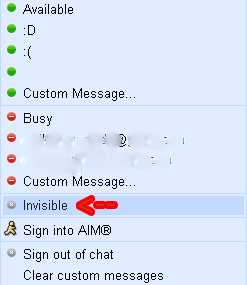
Find who is invisible on Google Talk !!!


Many people now days like remain on an invisible mode on GTalk.Even today when I was online this morning my friend was invisible on Gtalk. I wanted to chat with him but I didn't know he was online to.It was later in the day that I came to know that he was online.One of my friends once told me that there is a way to detect who is invisible on GTalk so today I searched For the trick and found it so I would like to share with you all.


The trick goes like this:

1. Set the chat as off the record with target user.

2. Open the chat window of person, whom you want to check if Invisible or Offline. Go to Options and click "Go Off Record".

3. Now send message to that user

4. If you get the message that "The user is offline and can’t receive messages right now " that means the user is offline.

5. But if you didn’t get any message that means User is online and is in invisible mode..:)

Browse Pay sites for free !!


I found a very interesting post recently on friend's site while I was going through my subscriptions and I liked it so much that I decided to share it with you. So many times we come across sites that demand money to show your favorite content. This becomes quite disappointing for us as we have to spend a large amount to view our favorite content, but in some of these sites we can go through our favorite content without paying any money.
This can be done if we disguise ourself as a search bot because some of these sites allow the search bots to let in without any payment to increase the hits on their sites.They detect search bots by its User Agent attribute (for Firefox, it is Mozilla 5.0), and allow only bots in. Hence you can exploit this weakness of the sites that these sites have created themselves.

The user agent defines the browser, what OS you are using, and other small bits of information.information. Switching user agent in various browsers require seperate procedure, as follows:
Visit DNSStuff to know your current user agent. Visiting it gave me the following report:

Changing the user agent is easy:


Browse pay sites on Firefox
Install User Agent Switcher Firefox extension and import this XML file by TechPatterns (do not click the link directly, instead right click and save) that has the required Googlebot/2.1. Once the file is loaded, configure your user agent to Googlebot 2.1


Pay sites on Internet Explorer

Change a registry entry, by opening Notepad, then copying the code below into it:

Windows Registry Editor Version 5.00 [HKEYLOCALMACHINESOFTWAREMicrosoftWindowsCurrentVersionInternet Settings5.0User Agent] @=”Googlebot/2.1″ “Compatible”=”+http://www.googlebot.com/bot.html”

Save as “uagent.reg” (with the quotes). Double click on it to load the setting. You could also go to the Registry directly, but my guess is that at least some of you are not comfortable working with the Registry.

To remove the hack, copy the following code into a Notepad window and save as “originaluagent.reg” (with the quotes) and double click it:

Windows Registry Editor Version 5.00 [HKEYLOCALMACHINESOFTWAREMicrosoftWindowsCurrentVersionInternet Settings5.0User Agent] @=”Mozilla/4.0 (compatible; MSIE 6.0; Windows NT 5.1)”

Finally, test whether the hack has taken effect by pointing your browser to DNSStuff website. The user agent should now be “Googlebot” according to DNSStuff.

Sunday, April 26, 2009

Oracle Buys Sun Microsystems

Tuesday, April 21, 2009: Oracle Corporation has agreed to buy California-headquartered Sun Microsystems in a $7.4 billion (or $9.50 per share) deal. Sun's acquisition by Oracle caught many in the industry by surprise as the deal came just two weeks after IBM abandoned its bid to buy Sun. According to analysts, the deal strengthens Oracle's position against IBM and HP for dominance of the server and storage markets.
Kapil Dev Singh, country manager, IDC India, said, "The Oracle-Sun merger brings together two strong brands with strengths in software and hardware space with the combined entity aspiring to make a mark in the enterprise IT space. Sun's strong computing platform and Oracle's middleware and database platforms will make Oracle's IT infrastructure offering stronger. What brings added value is their consolidated face as part of the bigger IT infrastructure offering in an environment where individually these components are a commodity."

"Oracle-Sun's competitive positioning in telecom and BFSI space will strengthen as individually both players have a strong presence in these segments that contribute about one-third of India's domestic IT market. The challenge for the merged entity lies in how well it can convince CIOs keen on leveraging their IT investments that is completely a services play. With applications, middleware and hardware piece in place, the services capability seems to be missing. This is important considering that the IT consolidation wave in enterprise space in general, and telecom and BFSI segments in particular, is slowly giving way to IT leverage wave. This deal seems to be little late from that perspective," he added.

There are substantial long-term customer advantages to Oracle owning two key Sun software assets: Java and Solaris. Java is one of the most widely deployed technologies, and it is the most important software Oracle has ever acquired. Oracle Fusion Middleware, Oracle’s fastest growing business, is built on top of Sun’s Java language and software. Oracle can now ensure continued investment in Java technology for the benefit of customers and the Java community.

The Sun Solaris operating system is claimed to be the leading platform for the Oracle database, Oracle’s largest business, and has been for a long time. With the acquisition of Sun, Oracle can optimise the Oracle database for some of the high-end features of Solaris. Oracle says it is as committed as ever to Linux and other open platforms and will continue to support and enhance our strong industry partnerships.

“We expect this acquisition to be accretive to Oracle’s earnings by at least 15 cents on a non-GAAP basis in the first full year after closing. We estimate that the acquired business will contribute over $1.5 billion to Oracle’s non-GAAP operating profit in the first year, increasing to over $2 billion in the second year. This would make the Sun acquisition more profitable in per share contribution in the first year than we had planned for the acquisitions of BEA, PeopleSoft and Siebel combined,” said Safra Catz, president, Oracle.

“The acquisition of Sun transforms the IT industry, combining best-in-class enterprise software and mission-critical computing systems,” said Larry Ellison, CEO, Oracle. “Oracle will be the only company that can engineer an integrated system – applications to disk – where all the pieces fit and work together so customers do not have to do it themselves. Our customers benefit as their systems integration costs go down while system performance, reliability and security go up.”

“Oracle and Sun have been industry pioneers and close partners for more than 20 years,” said Sun Chairman Scott McNealy. “This combination is a natural evolution of our relationship and will be an industry-defining event.”

Jonathan Schwartz, CEO, Sun, “From the Java platform touching nearly every business system on earth, powering billions of consumers on mobile handsets and consumer electronics, to the convergence of storage, networking and computing driven by the Solaris operating system and Sun’s SPARC and x64 systems. Together with Oracle, we’ll drive the innovation pipeline to create compelling value to our customer base and the marketplace.”

The board of directors of Sun Microsystems has unanimously approved the transaction. It is anticipated to close this summer, subject to Sun stockholder approval, certain regulatory approvals and customary closing conditions.

Saturday, April 11, 2009

Game Over: No IMEI, No Mobile Connection


About 250 lakh handsets are expected to be out of service from April 15, as GSM service providers, including Airtel and Vodafone, gear
up to deny connectivity to cell phones without International Mobile Equipment Identity (IMEI) number.

Concerned over the national security, the Department of Telecommunications (DoT) has asked operators to disconnect services to handset that does not have an IMEI number. IMEI is a 15-digit code which appears on the operator's network whenever a call is made.

If all service providers adhere to the deadline given by DoT, nearly 250 lakh handsets, which are almost 10 per cent of the total GSM mobile phones in use in the country and mostly China-made, are likely to go out of service, industry sources said.

Analysts feels that the move is also likely to hit the revenue of telecom firms as phones which have no IMEI numbers are usually low-cost and unbranded and used by low-end subscribers.

Thursday, April 09, 2009

Thin Is In: Size Zero Notebook From HP


The notebook measures less than one-inch thick and weighs 1.64 kgs.

Thursday, April 09, 2009: Thin is in for the notebook PC market. Entering the ultra-thin notebook race, HP has launched the HP Pavilion dv2 Entertainment Notebook PC in India. This size zero notebook is just under 1-inch thin and weighs 1.64 kgs.
The compact dv2 notebook packs a powerful punch internally as well. It is equipped with energy-efficient AMD Athlon Neo processor, ATI Radeon X1250 integrated graphics and optional ATI Mobility Radeon HD 3410 discrete graphics.

Inspired by liquid metallic forms, the clean architectural lines of each notebook is complemented by the 12.1” LED Backlit Widescreen display and a lustrous glossy finish in a choice of Espresso Black and Moonlight White HP Imprints. It houses a 12.1-inch diagonal HP BrightView display in a sturdy lightweight magnesium-alloy case.

Commenting on the launch, Diptesh Ghosh, category head, consumer notebook, HP Personal Systems Group (PSG), India, quipped, “We understand the discerning demands of people today and their aspiration to own a notebook that is not only good looking and portable but also kicks a punch when it comes to form and functionality, a notebook that suits their personality and lifestyle quotient. This is a perfect notebook meant for consumers who value a perfect mix of mobility, entertainment and productivity - at a competitive price.”

The dv2 also offers entertainment features including the integrated entertainment experience on the HP MediaSmart, and HD playback through an external Blu-Ray optical drive. Windows Vista technology and a variety of high-capacity hard drive options up to 500 gigabytes (GB) also provides ample room for the largest digital libraries, while HP ProtectSmart technology gives consumers peace of mind that their hard drives are protected even while on-the-go.

The dv2 also supports optional built-in WWAN for wireless connectivity and includes an HP Webcam and integrated microphone. With six-eight hours of battery life, Dv2 is also ENERGY STAR qualified and EPEAT Silver registered.

The HP Pavilion dv2 is available at Rs 37,490 (plus taxes).

Saturday, December 13, 2008

iRing

iRing is a control playback for your Apple media devices. As a simple ring which fits on a finger, it has a wireless Bluetooth connectivity with iPod and iPhone. “iRing features a bright OLED status display with touch-sensitive function strip, and a rechargeable battery life of up to 2 days. Conveniently recharge your iRing using the included cradle.” Neither price nor production dates are known.

Vaio Zoom::Future of laptop

Sony Vaio Zoom Concept is Exactly How We Want Laptops to Look in the Future.

This Vaio Zoom laptop concept is one of the coolest we've seen. Featuring a holographic glass screen that goes transparent and a keyboard that turns opaque when turned off, it's slick and beautiful. And sure, a touch keyboard like this would be extremely annoying without haptic feedback and screens like that don't really exist yet, but it's an interesting look at what we'll be playing with a few years down the line. Despite the fact that this isn't an official Sony concept, we still think they should work at making it a reality. Check another image after the jump.

Friday, December 05, 2008

How to Watch YouTube Videos While Working on other Tasks


You plan to watch a lengthy video clip on YouTube but the problem is that you have lot of other stuff to do and therefore can’t focus all the attention on just one video. You need to browse web pages, check emails in Outlook and maybe complete that presentation while the video plays on your screen.

Fortunately, this is possible with a simple hack - just decide where that video should be placed.

You can either watch the YouTube video from the Firefox sidebar or, if you are working with other application or don’t use Firefox, create a standalone YouTube player window and move it anywhere on the desktop in Always on Top mode. See screenshots.
Case 1. YouTube Player inside the Firefox Sidebar

Case 2. YouTube Player on top of other Windows

Here are the steps involved for either of the methods discussed above.

1. Get the full screen mode address of the YouTube video clip. It is something like www.youtube.com/v/ABC where ABC is the YouTube video ID.

For instance, if the YouTube video is located at www.youtube.com/watch?v=8bZ9z6BBMVY, the full screen player will be available at www.youtube.com/v/8bZ9z6BBMVY

2a. To watch the video in Firefox sidebar, bookmark that new YouTube address and check the "Load in Sidebar" property of the bookmark as shown in the screenshot.


2b: To watch the video in a standalone player, open a new browser window and copy-paste the YouTube address THAT you generated in step 1. Now resize the browser window to fit the player, activate the Always on Top program (download link) and press Ctrl + Spacebar to make sure that YouTube player stays in the foreground. That’s it.

Notes: While you may also use the regular YouTube video URL in either of these cases, the experience won’t be so great.

Open docx Files in Firefox without Office 2007

If you like to open .docx files without Office Word 2007, there’s a new Firefox extension from Microsoft that should help. Available for Windows as well as Linux machines.


Called OpenXML viewer, this plug-in (download link) lets you read docx files inside the Firefox browser just like any other HTML web page while retaining all the text formatting and layout.

There’s a command-line version of OpenXML viewer (download link) available as well for converting docx documents into HTML files that you may then open in any other web browser.

Other alternatives for reading docx files without Microsoft Office 2007 include Internet Explorer, Gmail, Email, Word viewer and the converter for Mac.

Monday, December 01, 2008

Skin-tenna: Antenna That Uses Skin To Transmit Signals


Researchers at Queen’s University Belfast, Northern Ireland, designed a wireless antenna that channels signals along human skin could broadcast signals over your body to connect up medical implants or portable gadgets. The new power-efficient approach could make more of established medical devices like pacemakers or help future implants distributed around the body work together.

Skin-tenna works by taking advantage of the creeping wave effect that allows waves to travel along a surface, due to mismatches between the air and the surface, and allows wireless devices (like pacemakers) to communicate more efficiently with devices anywhere on the body. Signals are channeled out sideways along the skin by this reflection and the conducting plate. That makes the antenna more efficient, which could double the battery life of body-worn gadgets.

The future may be filled with wearable device are powered by body heat or water or bacteria and communicate by sending signals along the surface of our skin. Now that’s a future that sounds exciting.