tep 1: First of all create a New Folder
Step 2: Right Click on the folder and select ‘Rename’
Step 3: Hold the ‘Alt’ key and type in 0160. Press Enter. You’ll notice that the folder will have no name.
Step 4: The final step is to change the icon in order to make it invisible.
Step 5: Right click on the folder and go to Properties > Customize > Change the icon > Select the blank one (there are about three of them, choose any one) > OK
How to delete that folder :
The folder which you have just creates has a name, even if you can’t see it.
Step 1: Open a Command Prompt (Start > Run > cmd)
Step 2: At the prompt, type: dir /x
That should show you all the files and folders in that directory.
The one that you named (alt + 0160) should appear with no name in the normal list of files, but the column before that should show it as “0A00~1″. That is the Short File Name, also known as the SFN or the 8.3 filename.
Step 3: Now use RD command to remove that folder: rd 0a00~1
Hope you liked the thread.
Wednesday, April 20, 2011
Google Search Tips and Tricks !!
Google Search Tricks:
Well let me tell You what actually google tricks mean. Google tricks/google tips, does not mean hacking google, Using the below Google operators, we can get the desired google result very quickly. Well we can name this as hidden google secrets or Advanced google searching. .
Google Trick -1 :- GOOGLE OPERATOR
Type the following highlited words in google search box.
Google has several google operators that can help you find specific information, specific websites or inquire about the indexing of your own site, below you will find the most important ones:
Click on the example google trick, and You will be redirected to google.
define: – This google operator will find definitions for a certain term or word over the Internet. Very useful when you come across a strange word when writing a post. I use this as a google dictionary. example : (define computer)
info: – The google info operator will list the sets of information that Google has from a specific website (i.e. info:http://hack2007.50webs.com)
site: – This google operator can be used to see the number of indexed pages on your site (i.e.site:www.hack2007.50webs.com). Alternative it can also be used to search for information inside a specific site or class of sites.
link: – This google link operator allows you to find backlinks pointing to your site. Unfortunately the count is not updated frequently and not all backlinks are shown
allinurl: – Using this Google operator will limit the search to results that contain the desired keywords on the URL structure. (i.e. allinurl:dailyblogtips)
fileformat: – Useful Google operator for finding specific file formats. Sometimes you know that the information you are looking for is likely to be contained in a PDF document or on a PowerPoint presentation, for instance. (i.e. “fileformat:.pdf market research” will search for PDF documents that contain the terms “market” and “research”)
Google trick -2 Top 10 Cool Google Search Tricks
well as we have gained enough knowledge regarding google operators, lets have a look at the following 10 cool google search tricks. Click on the example google trick, and You will be redirected to google.
1. Google trick to search different file formats (keyword filetype:doc)
2. Google trick to search educational resources (keyword site:.edu) example (computer site:.edu)
3. Finding the time of any location (time romania)
4. Finding the weather of any location (boston weather)
5. Tracking commentary of live events (Olympic games Beijing 2008)
6. Using Google as a calculator (9 * 10)(143+234)(119-8)
7. Converting currencies (1 USD in INR)(10 US Dollars in Indian Rupee)
8. Find how many teaspoons are in a quarter cup (quarter cup in teaspoons)
9. how many seconds there are in a year (seconds in a year)
10. Tracking stocks (stocks:MSFT)
11. Finding faces (add imgtype=face to the URL)
google trick -3 Top Essential Google Search shortcuts
#1: Get Local Weather
Type: “weather [city name or zip/postal code]” Example: “weather 500054″ or “weather boston”
#2: Check Flight Status
Google automagically pulls flight data from FlightStats.com. All you have to do is enter the flight number. Type: [flight name and/or number] Example: “bc254″ or “newyork21″
#3: Convert Distances
Type: “[value] [first distance unit] to [second distance unit]” Example: “100 kilometers to miles”
#4: Find a Phone Number
Find a Person:
Type: “[person’s name], [city or zip/postal code]” Example: “john smith, london”
Find a Business/store:
Type: “[business name or type], [city or zip/postal code]” Example: “book store, boston”
Google trick -4 :Google search trick for Rapidshare files search:
#1 site:rapidshare.com inurl:users “*”
#2 site:rapidshare.de inurl:users “*”
#3 site:rapidshare.com inurl:files “*”
#4 site:rapidshare.de inurl:files “*”
#5 site:rapidshare.com inurl:users (pass|password)
#6 site:rapidshare.de inurl:users (pass|password)
Suppose u need some info on ebooks. Then u can try following keyword to see all rapidshare folders having any hacking related thing in it
site:rapidshare.com inurl:users “ebooks”
Well let me tell You what actually google tricks mean. Google tricks/google tips, does not mean hacking google, Using the below Google operators, we can get the desired google result very quickly. Well we can name this as hidden google secrets or Advanced google searching. .
Google Trick -1 :- GOOGLE OPERATOR
Type the following highlited words in google search box.
Google has several google operators that can help you find specific information, specific websites or inquire about the indexing of your own site, below you will find the most important ones:
Click on the example google trick, and You will be redirected to google.
define: – This google operator will find definitions for a certain term or word over the Internet. Very useful when you come across a strange word when writing a post. I use this as a google dictionary. example : (define computer)
info: – The google info operator will list the sets of information that Google has from a specific website (i.e. info:http://hack2007.50webs.com)
site: – This google operator can be used to see the number of indexed pages on your site (i.e.site:www.hack2007.50webs.com). Alternative it can also be used to search for information inside a specific site or class of sites.
link: – This google link operator allows you to find backlinks pointing to your site. Unfortunately the count is not updated frequently and not all backlinks are shown
allinurl: – Using this Google operator will limit the search to results that contain the desired keywords on the URL structure. (i.e. allinurl:dailyblogtips)
fileformat: – Useful Google operator for finding specific file formats. Sometimes you know that the information you are looking for is likely to be contained in a PDF document or on a PowerPoint presentation, for instance. (i.e. “fileformat:.pdf market research” will search for PDF documents that contain the terms “market” and “research”)
Google trick -2 Top 10 Cool Google Search Tricks
well as we have gained enough knowledge regarding google operators, lets have a look at the following 10 cool google search tricks. Click on the example google trick, and You will be redirected to google.
1. Google trick to search different file formats (keyword filetype:doc)
2. Google trick to search educational resources (keyword site:.edu) example (computer site:.edu)
3. Finding the time of any location (time romania)
4. Finding the weather of any location (boston weather)
5. Tracking commentary of live events (Olympic games Beijing 2008)
6. Using Google as a calculator (9 * 10)(143+234)(119-8)
7. Converting currencies (1 USD in INR)(10 US Dollars in Indian Rupee)
8. Find how many teaspoons are in a quarter cup (quarter cup in teaspoons)
9. how many seconds there are in a year (seconds in a year)
10. Tracking stocks (stocks:MSFT)
11. Finding faces (add imgtype=face to the URL)
google trick -3 Top Essential Google Search shortcuts
#1: Get Local Weather
Type: “weather [city name or zip/postal code]” Example: “weather 500054″ or “weather boston”
#2: Check Flight Status
Google automagically pulls flight data from FlightStats.com. All you have to do is enter the flight number. Type: [flight name and/or number] Example: “bc254″ or “newyork21″
#3: Convert Distances
Type: “[value] [first distance unit] to [second distance unit]” Example: “100 kilometers to miles”
#4: Find a Phone Number
Find a Person:
Type: “[person’s name], [city or zip/postal code]” Example: “john smith, london”
Find a Business/store:
Type: “[business name or type], [city or zip/postal code]” Example: “book store, boston”
Google trick -4 :Google search trick for Rapidshare files search:
#1 site:rapidshare.com inurl:users “*”
#2 site:rapidshare.de inurl:users “*”
#3 site:rapidshare.com inurl:files “*”
#4 site:rapidshare.de inurl:files “*”
#5 site:rapidshare.com inurl:users (pass|password)
#6 site:rapidshare.de inurl:users (pass|password)
Suppose u need some info on ebooks. Then u can try following keyword to see all rapidshare folders having any hacking related thing in it
site:rapidshare.com inurl:users “ebooks”
How To: Change Your Ip In Less Then One Minute ?
How To: Change Your Ip In Less Then 1 Minute
1. Click on “Start” in the bottom left hand corner of screen
2. Click on “Run”
3. Type in “command” and hit ok
You should now be at an MSDOS prompt screen.
4. Type “ipconfig /release” just like that, and hit “enter”
5. Type “exit” and leave the prompt
6. Right-click on “Network Places” or “My Network Places” on your desktop.
7. Click on “properties”
You should now be on a screen with something titled “Local Area Connection”, or something close to that, and, if you have a network hooked up, all of your other networks.
8. Right click on “Local Area Connection” and click “properties”
9. Double-click on the “Internet Protocol (TCP/IP)” from the list under the “General” tab
10. Click on “Use the following IP address” under the “General” tab
11. Create an IP address (It doesn’t matter what it is. I just type 1 and 2 until i fill the area up).
12. Press “Tab” and it should automatically fill in the “Subnet Mask” section with default numbers.
13. Hit the “Ok” button here
14. Hit the “Ok” button again
You should now be back to the “Local Area Connection” screen.
15. Right-click back on “Local Area Connection” and go to properties again.
16. Go back to the “TCP/IP” settings
17. This time, select “Obtain an IP address automatically”
18. Hit “Ok”
19. Hit “Ok” again
20. You now have a new IP address
With a little practice, you can easily get this process down to 15 seconds.
P.S:
This only changes your dynamic IP address, not your ISP/IP address. If you plan on hacking a website with this trick be extremely careful, because if they try a little, they can trace it back.
1. Click on “Start” in the bottom left hand corner of screen
2. Click on “Run”
3. Type in “command” and hit ok
You should now be at an MSDOS prompt screen.
4. Type “ipconfig /release” just like that, and hit “enter”
5. Type “exit” and leave the prompt
6. Right-click on “Network Places” or “My Network Places” on your desktop.
7. Click on “properties”
You should now be on a screen with something titled “Local Area Connection”, or something close to that, and, if you have a network hooked up, all of your other networks.
8. Right click on “Local Area Connection” and click “properties”
9. Double-click on the “Internet Protocol (TCP/IP)” from the list under the “General” tab
10. Click on “Use the following IP address” under the “General” tab
11. Create an IP address (It doesn’t matter what it is. I just type 1 and 2 until i fill the area up).
12. Press “Tab” and it should automatically fill in the “Subnet Mask” section with default numbers.
13. Hit the “Ok” button here
14. Hit the “Ok” button again
You should now be back to the “Local Area Connection” screen.
15. Right-click back on “Local Area Connection” and go to properties again.
16. Go back to the “TCP/IP” settings
17. This time, select “Obtain an IP address automatically”
18. Hit “Ok”
19. Hit “Ok” again
20. You now have a new IP address
With a little practice, you can easily get this process down to 15 seconds.
P.S:
This only changes your dynamic IP address, not your ISP/IP address. If you plan on hacking a website with this trick be extremely careful, because if they try a little, they can trace it back.
How to Disable Windows logo Key ?
I was recently playing games and this nasty windos logo key keep annoying me , cause i often accidently clicked it , and i start to search a solution to solve my problem, and found the following article in microsfot website, and it did work, hope this helps, thanks!
CODE
http://support.microsoft.com/?kbid=181348
or in other articles, u can copy the following messages into ur notepad and save as *.reg, and use it..
Windows Registry Editor Version 5.00
[HKEY_LOCAL_MACHINE\SYSTEM\CurrentControlSet\Control\Keyboard Layout]
“Scancode Map”=hex:00,00,00,00,00,00,00,00,03,00,00,00,00,00,5b,e0,00,00,5c,e0,\
00,00,00,00
Hope you like this post if you liked it do share this with your friends .
CODE
http://support.microsoft.com/?kbid=181348
or in other articles, u can copy the following messages into ur notepad and save as *.reg, and use it..
Windows Registry Editor Version 5.00
[HKEY_LOCAL_MACHINE\SYSTEM\CurrentControlSet\Control\Keyboard Layout]
“Scancode Map”=hex:00,00,00,00,00,00,00,00,03,00,00,00,00,00,5b,e0,00,00,5c,e0,\
00,00,00,00
Hope you like this post if you liked it do share this with your friends .
Tuesday, April 19, 2011
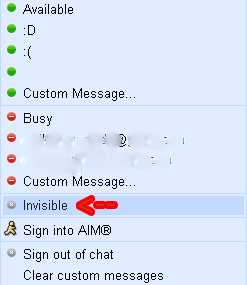
Find who is invisible on Google Talk !!!
Many people now days like remain on an invisible mode on GTalk.Even today when I was online this morning my friend was invisible on Gtalk. I wanted to chat with him but I didn't know he was online to.It was later in the day that I came to know that he was online.One of my friends once told me that there is a way to detect who is invisible on GTalk so today I searched For the trick and found it so I would like to share with you all.
The trick goes like this:
1. Set the chat as off the record with target user.
2. Open the chat window of person, whom you want to check if Invisible or Offline. Go to Options and click "Go Off Record".
3. Now send message to that user
4. If you get the message that "The user is offline and can’t receive messages right now " that means the user is offline.
5. But if you didn’t get any message that means User is online and is in invisible mode..:)
Browse Pay sites for free !!
I found a very interesting post recently on friend's site while I was going through my subscriptions and I liked it so much that I decided to share it with you. So many times we come across sites that demand money to show your favorite content. This becomes quite disappointing for us as we have to spend a large amount to view our favorite content, but in some of these sites we can go through our favorite content without paying any money.
This can be done if we disguise ourself as a search bot because some of these sites allow the search bots to let in without any payment to increase the hits on their sites.They detect search bots by its User Agent attribute (for Firefox, it is Mozilla 5.0), and allow only bots in. Hence you can exploit this weakness of the sites that these sites have created themselves.
The user agent defines the browser, what OS you are using, and other small bits of information.information. Switching user agent in various browsers require seperate procedure, as follows:
Visit DNSStuff to know your current user agent. Visiting it gave me the following report:
Changing the user agent is easy:
Browse pay sites on Firefox
Install User Agent Switcher Firefox extension and import this XML file by TechPatterns (do not click the link directly, instead right click and save) that has the required Googlebot/2.1. Once the file is loaded, configure your user agent to Googlebot 2.1
Pay sites on Internet Explorer
Change a registry entry, by opening Notepad, then copying the code below into it:
Windows Registry Editor Version 5.00 [HKEYLOCALMACHINESOFTWAREMicrosoftWindowsCurrentVersionInternet Settings5.0User Agent] @=”Googlebot/2.1″ “Compatible”=”+http://www.googlebot.com/bot.html”
Save as “uagent.reg” (with the quotes). Double click on it to load the setting. You could also go to the Registry directly, but my guess is that at least some of you are not comfortable working with the Registry.
To remove the hack, copy the following code into a Notepad window and save as “originaluagent.reg” (with the quotes) and double click it:
Windows Registry Editor Version 5.00 [HKEYLOCALMACHINESOFTWAREMicrosoftWindowsCurrentVersionInternet Settings5.0User Agent] @=”Mozilla/4.0 (compatible; MSIE 6.0; Windows NT 5.1)”
Finally, test whether the hack has taken effect by pointing your browser to DNSStuff website. The user agent should now be “Googlebot” according to DNSStuff.
Saturday, April 16, 2011
Talking To The Moon Lyrics
I know you're somewhere out there
Somewhere far away
I want you back
I want you back
My neighbors think
I'm crazy
But they don't understand
You're all I have
You're all I have
Chorus:
At night when the stars
light up my room
I sit by myself
Talking to the Moon
Trying to get to You
In hopes you're on
the other side
Talking to me too
Or am I a fool
who sits alone
Talking to the moon
I'm feeling like I'm famous
The talk of the town
They say
I've gone mad
Yeah
I've gone mad
But they don't know
what I know
Cause when the
sun goes down
someone's talking back
Yeah
They're talking back
Chorus:
At night when the stars
light up my room
I sit by myself
Talking to the Moon
Trying to get to You
In hopes you're on
the other side
Talking to me too
Or am I a fool
who sits alone
Talking to the moon
Ahh Ahh,
Ahh Ahh,
Do you ever hear me calling?
Cause every night
I'm talking to the moon
Still trying to get to you
In hopes you're on
the other side
Talking to me too
Or am I a fool
who sits alone
Talking to the moon
I know you're somewhere out there
Somewhere far away
Somewhere far away
I want you back
I want you back
My neighbors think
I'm crazy
But they don't understand
You're all I have
You're all I have
Chorus:
At night when the stars
light up my room
I sit by myself
Talking to the Moon
Trying to get to You
In hopes you're on
the other side
Talking to me too
Or am I a fool
who sits alone
Talking to the moon
I'm feeling like I'm famous
The talk of the town
They say
I've gone mad
Yeah
I've gone mad
But they don't know
what I know
Cause when the
sun goes down
someone's talking back
Yeah
They're talking back
Chorus:
At night when the stars
light up my room
I sit by myself
Talking to the Moon
Trying to get to You
In hopes you're on
the other side
Talking to me too
Or am I a fool
who sits alone
Talking to the moon
Ahh Ahh,
Ahh Ahh,
Do you ever hear me calling?
Cause every night
I'm talking to the moon
Still trying to get to you
In hopes you're on
the other side
Talking to me too
Or am I a fool
who sits alone
Talking to the moon
I know you're somewhere out there
Somewhere far away
Subscribe to:
Posts (Atom)